고객 서비스

판매자들은 가입하면 더 많은 혜택을 누릴 수 있습니다.

모든 주문 무료 배송.

인쇄기

Canon imageCLASS LBP246dw II - Monochrome Duplex, Wireless Laser Printer, Single Function, with 1 Year Limited Warranty, 42 PPM

4.40

지난 32시간 동안 판매됨 32

$ 249.00
$ 260.00
-4.42%

I have done the simplest possible setup... USB cable to a hub, and it works great. The diagnostics aren't very good unless you install the full Canon software suite, which I haven't done.The first page print is nearly instantaneous, and the pages keep coming.I thought the paper drawer had a slightly flimsy feel compared to an older Brother printer I've been using, but it seems to be up to the job. The rest of the printer must be solid enough, because if is surprisingly heavy for its size.

16 현재 누군가가 웹사이트를 탐색 중입니다.

Style
New Model Old Model
수량:
- +

예상 배송 시간: 12~26일(국제), 3~6일(미국)

구매일로부터 45일 이내에 반품이 가능합니다. 관세 및 세금은 환불되지 않습니다.

  • ADDITIONAL_PRINTER_FUNCTIONS:

    Print Only

  • ASIN:

    B0FMBGZZBW

  • BEST_SELLERS_RANK:

    #57,952 in Office Products (See Top 100 in Office Products) #80 in Laser Computer Printers

  • COMPATIBLE_CARTRIDGE:

    Canon Genuine Toner 070

  • COMPATIBLE_DEVICES:

    Laptops, PC, Smartphones

  • CONTROL_METHOD:

    App

  • CUSTOMER_REVIEWS:

    4.4 4.4 out of 5 stars (78) 4.4 out of 5 stars

  • DATE_FIRST_AVAILABLE:

    August 13, 2025

  • DUAL_SIDED_PRINTING:

    Yes

  • DUPLEX:

    Automatic

  • EU_SPARE_PART_AVAILABILITY_DURATION:

    1 Years

  • HARDWARE_INTERFACE:

    Ethernet, USB 2.0

  • INCLUDED_COMPONENTS:

    Canon Genuine Toner Cartridge 070 Black Starter, Approx. 1,500 Page Yield, Documentation, Power Cord, User Software DVD-ROM, imageCLASS LBP246dw II Printer

  • INITIAL_PAGE_PRINT_TIME:

    4.9 Seconds

  • INK_COLOR:

    black

  • ITEM_MODEL_NUMBER:

    7187C005

  • ITEM_WEIGHT:

    25.4 pounds

  • MANUFACTURER:

    Canon

  • MAX_COPY_RESOLUTION_BLACK_WHITE:

    1200 x 1200

  • MAX_COPY_SPEED_BLACK_WHITE:

    42 ppm

  • MAX_INPUT_SHEET_CAPACITY:

    800

  • MAXIMUM_BLACK_AND_WHITE_PRINT_RESOLUTION:

    1200 x 1200 Dots Per Inch

  • MAXIMUM_MEDIA_SIZE:

    Legal (8.5 x 14 inches)

  • MODEL_SERIES:

    imageCLASS LBP246dw

  • NUMBER_OF_TRAYS:

    2

  • POWER_CONSUMPTION:

    1180 Watts

  • PRINT_MEDIA:

    High-resolution paper, Paper (plain), Unknown

  • PRINTER_INK_TYPE:

    Toner

  • PRODUCT_DIMENSIONS:

    14.7 x 15.7 x 9.8 inches

  • SHEET_SIZE:

    Standard/Optional Cassette: Min. 4.1" x 5.8" to Max. 8.5" x 14". Multipurpose Tray: Min. 3" x 5" to Max. 8.5" x 14" Inches

  • SPECIFIC_USES_FOR_PRODUCT:

    Home, Office

  • SUPPORTED_MEDIA_SIZES:

    Legal (8.5 x 14 inches)

  • TOTAL_USB_PORTS:

    1

  • UPC:

    013803386745

  • WARRANTY_TYPE:

    limited

  • WATTAGE:

    6 watts

안전한 결제를 보장하세요
제품 상세 정보
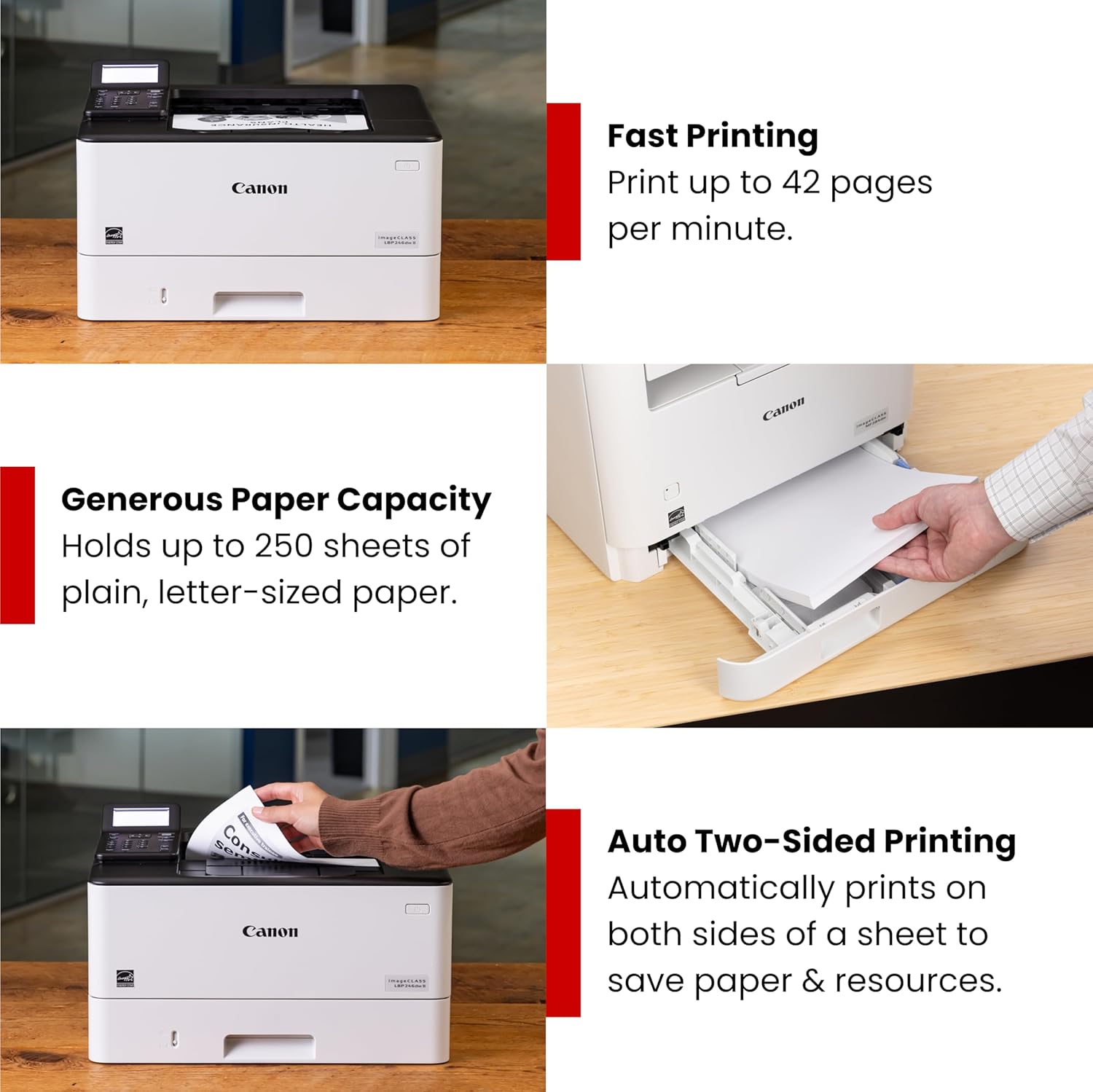
Designed for small / home offices and hybrid work environments, the imageCLASS LBP246dw II model balances speedy performance and minimal maintenance. The LBP246dw II is easy to set up and has a 5-line LCD screen. Print crisp black and white documents with fast print speeds of up to 42 pages per minute, using high quality Canon Genuine Toner 070 / 070 H. Duplex (2-sided) printing helps save paper and limit replacements. The LBP246dw II offers a plain paper capacity of up to 250 sheets in the standard cassette, 100 sheets in the multipurpose tray, and an expandable paper capacity of up to 900 sheets using optional cassette AH-1 which holds up to 550 sheets. Easily connect wirelessly from computers or mobile devices. Print using a variety of mobile apps, including the Canon PRINT app using your compatible mobile device. The LBP246dw II comes with a 1-year limited warranty and is backed by Canon's Service and Support network.
고객 리뷰
4.40

(100 점수)

5
7
4
2
3
4
2
16
1
71
댓글 취소
댓글을 남겨주세요

16 논평

5.0 out of 5 stars Hey it works well.
2026-02-09    -Malinourn

Have been using it on and off for 9 months and no issues. Setup was not that hard. Does require a little bit of reading. Does everything it says it can do. The Wi-Fi connection is very good.The app was a bit clunky to get going but once you get through the process not so bad.Would recommend to whome it's a good fit

5.0 out of 5 stars Hey it works well.
2026-02-15    -Malinourn

Have been using it on and off for 9 months and no issues. Setup was not that hard. Does require a little bit of reading. Does everything it says it can do. The Wi-Fi connection is very good.The app was a bit clunky to get going but once you get through the process not so bad.Would recommend to whome it's a good fit

5.0 out of 5 stars Great printer!
2026-02-06    -Parker Jones

This printer has been great! We previously owned a printer that always had issues and our ink cartridges would dry out quickly. This printer hasn’t had any problems and has been relatively simple to use. The software UI isn't great, but neither are any other printer brands it seems. I couldn’t figure out how to use the printer for printing on index cards so I called Canon customer service and they were super helpful and walked me through the solution. We print on this nearly every day for our daughter’s unsatiable coloring hobby and that alone has been worth the purchase. This printer also has really great reviews on Consumer Reports. The highest rated printer on CR for black and white laser printers is this same printer except with a touch screen (and much higher cost), but everything else is literally the exact same. I’d recommend it!

easy to setup and connect via bluetoothThe SETUP Guide has too little informationThe disc provided has TOO MUCH informationPrint was excellent. Response fast.Control panel not self-evident to use and too many attempts to get user to signup for automatic ink cartridge replacement.

5.0 out of 5 stars Strong, efficient , printer .
2026-03-04    -shenanigans631

When I print I often leave completed pages in the output tray and grab them the next day. I hit print and move on until I need the documents. Often I am in a different room than my printer. The most frustrating thing for me is having to 'fix' my printer to complete the job. This printer is a bull. Never stopped mid job. I hit print button and move on until I need to collect my documents. Cost is very reasonable. Toner usage is efficient. Very happy with this product. It does not print in color but I chose to spend on a solid printer over color. Will upgrade at some point , but a solid printer that is in color comes with a price tag.

Nice printer. works fast.

Nice printer. works fast.

I’ve been doing PCs since the early 1980’s, about 47 years. I’ve made my own computers back when parts were affordable. I’ve followed computer technology since the LSI, DEC existed, and BASIC was the latest & greatest. I know computers, accessories, and software. But, I could not het the image CLASS setup.I read the Manual and Setup brochure. I followed the directions, and made sure I did it right. No QR code, really! As a Mac and PC user, I never had any problem with any Canon printer or imageCLASS copier, printer, fax machine. Not recommended except for the most accomplished technical person.

I've only had it for a week, but so far I love this printer. First page is out in about 6 seconds. My previous printer was an HP laser mfp m130fw, 3 years old, the canon is sooo much faster and more reliable. The HP was frequently "offline" and had to be restarted, and although it was rated at 22 ppm, it literally took 2 minutes per page to print anything. This cannon prints a 10 page document in under 20 seconds, the same document took almost 10 minutes to print on the HP. So far the cannon has always printed reliably anytime I send it a print from any device it powers up and prints quickly with no connectivity problems. You can't go wrong with this printer.

easy to setup and connect via bluetoothThe SETUP Guide has too little informationThe disc provided has TOO MUCH informationPrint was excellent. Response fast.Control panel not self-evident to use and too many attempts to get user to signup for automatic ink cartridge replacement.

댓글을 남겨주세요:

댓글 제목
댓글 내용
배송 및 반품
우리가 당신을 보호하겠습니다

대부분 지역에서는 배송비를 한 번만 지불하시면 됩니다 (주문 및 배송 페이지를 확인해 주세요).

구매 후 14일 이내 무료 반품 가능 (단, 수명이 다한 제품, 맞춤 제작 상품, 마스크, 향수 및 에어로졸과 같이 위험하거나 인화성 물질이 포함된 일부 제품은 제외).

수입 관세 정보

복잡한 절차는 저희가 처리해 드리겠습니다. 카나리아 제도를 제외한 모든 EU 국가, 영국, 미국, 캐나다, 호주, 뉴질랜드, 푸에르토리코, 스위스, 싱가포르, 한국, 쿠웨이트, 멕시코, 카타르, 인도, 노르웨이, 사우디아라비아, 대만, 태국, UAE, 일본, 브라질, 맨섬, 산마리노, 콜롬비아, 칠레, 아르헨티나, 이집트, 레바논, 홍콩 특별행정구, 바레인, 터키로 배송되는 상품 가격에는 모든 수입 관세가 포함되어 있습니다. 표시된 가격이 최종 결제 금액입니다.

예상 배송 시간

특급 배송: 7-10일

해당 창고에서 배송되었습니다.

더 자세한 정보가 필요하신가요?
반품 정책
반품 정책

저희는 제품 품질에 자신 있습니다. 만약 구매하신 제품에 완전히 만족하지 못하신다면, 수령일로부터 30일 이내에 간편하게 반품하실 수 있도록 정책을 마련해 두었습니다.

간편한 교환 또는 환불
  • 다른 사이즈, 색상 또는 스타일의 상품으로 교환하거나 전액 환불받을 수 있습니다.
  • 반품되는 모든 상품은 착용하지 않은 상태여야 하며, 원래 포장 상태 그대로 모든 태그가 손상되지 않은 상태여야 합니다.
간단한 절차
  • 온라인으로 반품을 신청하거나 고객 서비스 팀에 문의하여 도움을 받으실 수 있습니다.
  • 물품을 제대로 포장해 주시고, 원래의 포장 목록도 함께 넣어주세요.
  • 반품하실 상품을 보내주실 때에는 저희가 제공해 드린 선불 배송 라벨을 사용해 주시기 바랍니다.
  • 환불 요청 접수 즉시 처리해 드리겠습니다.

반품과 관련하여 궁금한 점이나 우려 사항이 있으시면 언제든지 저희 전문 고객 서비스 팀에 문의해 주세요. 고객 만족은 저희의 최우선 목표입니다.

범주
차이
제품
모든 제품 지우기