고객 서비스

판매자들은 가입하면 더 많은 혜택을 누릴 수 있습니다.

모든 주문 무료 배송.

인쇄기

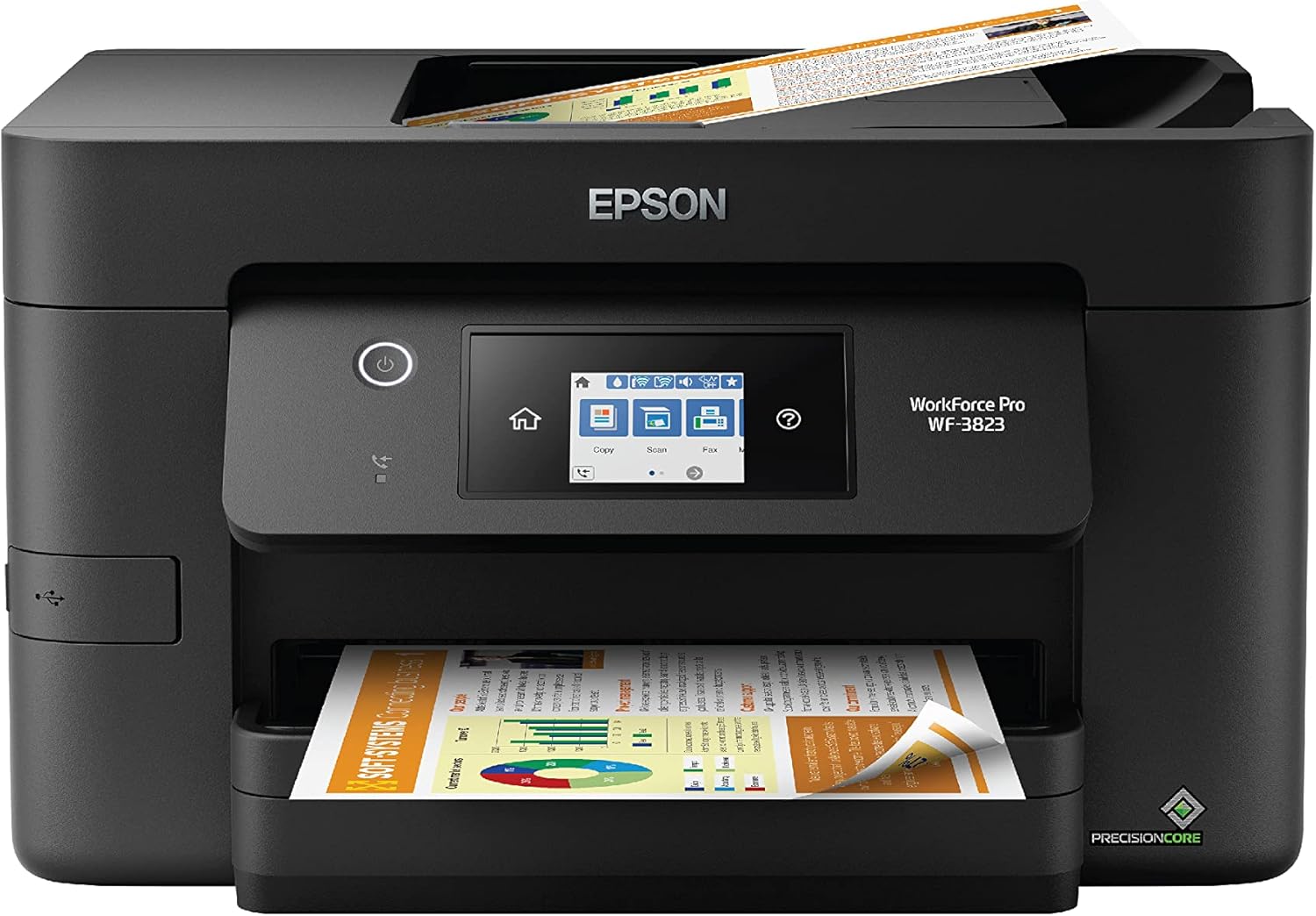
Epson Workforce Pro WF-3823 Wireless All-in-One Printer with Auto 2-Sided Printing, 35-Page ADF, 250-Sheet Paper Tray and 2.7" Color Touchscreen, Black

3.90

지난 32시간 동안 판매됨 34

$ 79.99
$ 84.00
-5.01%

This is probably the sixth printer I've purchased, of which this is the second Epson. My first Epson, which is an earlier WF version, is probably at least ten years old and still operates the same as it did when I first purchased it at least ten years ago. The other three printers were a very well known brand, which I won't mention here, and none survived more than a couple of years each. This brand new Epson WF 3823 took about two weeks to arrive, but it was well worth the wait. It was very easy to set up as it took me all of four minutes to connect to my network and print out my first page. And for $80, I feel like they gave it away.

16 현재 누군가가 웹사이트를 탐색 중입니다.

Style
WF-3820 (Renewed) WF-3823 WF-3820
수량:
- +

예상 배송 시간: 12~26일(국제), 3~6일(미국)

구매일로부터 45일 이내에 반품이 가능합니다. 관세 및 세금은 환불되지 않습니다.

  • ADDITIONAL_PRINTER_FUNCTIONS:

    All In One

  • ASIN:

    B0BMSS7C2D

  • BEST_SELLERS_RANK:

    #2,958 in Office Products (See Top 100 in Office Products) #25 in Inkjet Computer Printers

  • COLOR_DEPTH:

    24 bpp

  • COMPATIBLE_CARTRIDGE:

    T822

  • COMPATIBLE_DEVICES:

    Smartphones

  • CONTROL_METHOD:

    App

  • CONTROLLER_TYPE:

    Android

  • CUSTOMER_REVIEWS:

    3.9 3.9 out of 5 stars (3,472) 3.9 out of 5 stars

  • DATE_FIRST_AVAILABLE:

    November 18, 2022

  • DUAL_SIDED_PRINTING:

    Yes

  • DUPLEX:

    Automatic

  • HARDWARE_INTERFACE:

    Ethernet, USB

  • INCLUDED_COMPONENTS:

    WorkForce Pro WF-3823 printer, quick setup guide, CD-ROM with drivers, power cord, 4x DURABrite Ultra Ink cartridges (1x Black ink cartridge and 3x color ink cartridges: 1x Cyan, 1x Magenta, 1x Yellow)

  • INK_COLOR:

    Black

  • ITEM_MODEL_NUMBER:

    C11CJ07202

  • ITEM_WEIGHT:

    19.4 pounds

  • MANUFACTURER:

    Epson

  • MAX_COPY_RESOLUTION_BLACK_WHITE:

    1200 x 1200 dots_per_inch

  • MAX_COPY_RESOLUTION_COLOR:

    4800 x 2400 dpi

  • MAX_COPY_SPEED_BLACK_WHITE:

    21 ppm

  • MAX_INPUT_SHEET_CAPACITY:

    250

  • MAXIMUM_BLACK_AND_WHITE_PRINT_RESOLUTION:

    4800 x 2400 Dots Per Inch

  • MAXIMUM_COLOR_PRINT_RESOLUTION:

    4800 x 2400 Dots Per Inch

  • MAXIMUM_COPIES_PER_RUN:

    100

  • MAXIMUM_MEDIA_SIZE:

    8.5 x 14 inch

  • MODEL_SERIES:

    WF

  • NUMBER_OF_TRAYS:

    1

  • POWER_CONSUMPTION:

    17 Watts

  • PRINT_MEDIA:

    Paper (plain)

  • PRINTER_INK_TYPE:

    DURABrite Ultra pigment inks

  • PROCESSOR_COUNT:

    1

  • PRODUCT_DIMENSIONS:

    19.4"D x 16.7"W x 9.8"H

  • SCANNER_TYPE:

    Flatbed, Sheetfed

  • SERIES_NUMBER:

    3823

  • SHEET_SIZE:

    3.5" x 5", 4" x 6", 5" x 7", 8" x 10", Letter, Legal

  • SUPPORTED_MEDIA_SIZES:

    Legal (8.5 x 14 inches), Letter (8.5 x 11 inches)

  • TOTAL_USB_PORTS:

    1

  • UPC:

    010343954557

  • WARRANTY_TYPE:

    Limited

  • WATTAGE:

    17 watts

안전한 결제를 보장하세요
제품 상세 정보
Bring a new level of productivity to your business with the ultra efficient WorkForce Pro WF-3823 all-in-one printer. Designed for high-volume print environments, the WF-3823 delivers precise, professional-quality prints at fast speeds up to 21 (black)/11 (color) ISO ppm (†) using vibrant DURABrite® Ultra instant-dry pigment inks. A breakthrough in business printing, the WF-3823 features Epson’s innovative PrecisionCore Heat-Free Technology™ designed for enhanced reliability with minimal downtime. Built with convenience in mind, the WF-3823 offers a variety of user-friendly features to support easy, streamlined printing for small workgroups, including auto 2-sided printing, a large, 250-sheet paper capacity, built-in wireless and a 2.7" color touchscreen for quick navigation and control. *This product uses only genuine Epson-brand cartridges. Other brands of ink cartridges and ink supplies are not compatible and, even if described as compatible, may not function properly or at all. | † Black and color print speeds are measured in accordance with ISO/IEC 24734. Actual print times will vary based on factors including system configuration, software, and page complexity. For more information, visit www.epson.com/printspeed | 1. Requires Epson Smart Panel app download. Data usage fees may apply. | 2. Most features require an Internet connection to the printer, as well as an Internet- and/or email-enabled device. For a list of Epson Connect™ enabled printers and compatible devices and apps, visit www.epson.com/connect | 3. Wi-Fi CERTIFIED™; level of performance subject to the range of the router being used. Wi-Fi Direct may require printer software.
고객 리뷰
3.90

(100 점수)

5
17
4
4
3
6
2
13
1
60
댓글 취소
댓글을 남겨주세요

24 논평

5.0 out of 5 stars Nice All-In-One Printer
2026-01-09    -Carden A.

Unlike my other printer (hp Envy) this printer maintains a strong Wi-Fi connection, and I don’t have to wake it to start a printing process. It is not too wide, but it is a bit on the tall side (much like a cube) and mainly has to be stored on top of a shelf/desk.Colors are good and print quality is nice too. It was very easy to set up, however, one of my devices couldn’t establish a connection with the printer and I had to connect via ip address (not that hard to find and add).So far I have not experienced any ink smudges or bleeding on anything I’ve printed yet. It is user friendly and I believe it is a mid-range printer of high results that every small business or home should have at a very good price.

su rendimiento
2026-02-01    -maria v.

muy practica para trabajar

Excellent
2026-03-03    -Martin52

Très Bonne imprimante, facile a utiliser…

5.0 out of 5 stars Great Home Printer
2026-01-23    -Monica Vaughn

I have only had this printer for two days now, but I love it! It was very easy to set up. There are no cables from the computer to the printer, because it is done wirelessly.I had some jobs ready for copying. The first feature I tried out was the top multi page feeder. I put in 18 pages and decided I wanted to copy them from one sided to two sided.The touchscreen was extremely user-friendly, and it was easy to figure out how to go from one to two sided. As it started copying the papers, it worked quickly for a home printer, and The printer/copier pulled the first page back and printed on the back and then went onto the next page without any problems.The next job I needed done was taking two pages and printing them on the same side of one page. Again, I was impressed with how easy it was to find exactly what I needed to do on the touchscreen, And then what made it even better was it automatically adjusted the size that I needed in order to fit both papers on one side of a single page.The third job I had to do was scan a document in order to email it to somebody. I do not have it set it up to scan directly to an email, but that is an option you can set up. I had the system set up on my computer to scan and send it to my computer. I was surprised how easy that was to do as well.I also had to print two documents from two different phones, and it was a breeze.I am extremely pleased with this product, and I would recommend anybody who needs a simple home printer/copier to look into this product.

5.0 out of 5 stars Good printer
2026-02-12    -Beatrice A Rice

Good printer. Easy to install if you read the instructions

5.0 out of 5 stars Good printer
2026-02-01    -Beatrice A Rice

Good printer. Easy to install if you read the instructions

4.0 out of 5 stars Good Printer
2026-01-31    -Christy

This is a good printer overall. It's slightly larger than the last Workforce Pro model I owned. Printing and scanning functions work very well. However, one issue I've noticed is that the printer occasionally pulls multiple sheets of paper at once. While it's usually a minor inconvenience, there are times when it ends up printing across multiple pages, which can be frustrating.

Tintas e rendimento custo benefício
2026-01-28    -Guilherme Carriel de Lima

É rápida e eficaz mas para se obter um melhor custo benefício em relação a consumíveis e tintas deve se fazer um upgrade. Você sabe.

5.0 out of 5 stars Good Printer
2026-02-24    -Dave Goodwin

Given the 'not so good' reviews, I was a little apprehensive to buy this printer at first. This replaces a WF3620, in which I was very happy with its performance. But the print head began to print only Yellow and Black, and several attempts to 'unclog' the Cyan and Magenta nossles proved unsuccessful.But, I am very happy with the WF3820 - both with the price and the performance. It is faster and the graphics are clear and sharp. The 'jury' is still out on how much toner it uses, but suspect it is around the same as with the WF3620. If so, then I will retain my 5 Star rating.

This printer is now an expensive paper weight after only 5 months.I bought this printer in September 2022. It was always a little glitchy with the wireless printing, so I had to connect it to my PC with a USB cable. Not a big deal.The Epson printer cartridge are quite pricey, so I began using remanufactured Epson 822 ink cartridges, also without incident.Until yesterday. I was printing something when I got a "firmware update available" notice. So once the printing was done I download the update. After it was installed, the printer immediately flashed an error message, it was rejecting the remanufactured cartridge that was working fine before the update. So I replaced it with a different remanufactured cartridge, same thing.So I called Epson, and I got the corporate BS that it wasn't their fault, it must be a faulty remanufactured cartridge. A guy in the next office has the same printer, but was smart enough not to download the update. So I tested three different remanufactured cartridges in his WF-3820, and actually also in his assistant's, and they worked fine. The only difference being neither of them downloaded the update.So I called Epson back and was told in no uncertain terms that they don't guarantee third party cartridges, which is fine, that I understand. I also got an admission that there were some "changes" to the system in the current firmware update that "might" render third party cartridges that worked before inoperable. For the record, that is not legal if it's not disclosed, which it wasn't, but they don't care.I am getting rid of this printer, I will make up the cost in the savings from two or three remanufactured cartridges for whatever printer I buy, but rest assured it will NOT be an Epson.If you are thinking of buying a WF-3820, just take the money and flush it down the toilet, it basically the same result that I had with this piece of garbage, and then buy a non-Epson printer.I wish did class actions, this is ripe for one.

댓글을 남겨주세요:

댓글 제목
댓글 내용
배송 및 반품
우리가 당신을 보호하겠습니다

대부분 지역에서는 배송비를 한 번만 지불하시면 됩니다 (주문 및 배송 페이지를 확인해 주세요).

구매 후 14일 이내 무료 반품 가능 (단, 수명이 다한 제품, 맞춤 제작 상품, 마스크, 향수 및 에어로졸과 같이 위험하거나 인화성 물질이 포함된 일부 제품은 제외).

수입 관세 정보

복잡한 절차는 저희가 처리해 드리겠습니다. 카나리아 제도를 제외한 모든 EU 국가, 영국, 미국, 캐나다, 호주, 뉴질랜드, 푸에르토리코, 스위스, 싱가포르, 한국, 쿠웨이트, 멕시코, 카타르, 인도, 노르웨이, 사우디아라비아, 대만, 태국, UAE, 일본, 브라질, 맨섬, 산마리노, 콜롬비아, 칠레, 아르헨티나, 이집트, 레바논, 홍콩 특별행정구, 바레인, 터키로 배송되는 상품 가격에는 모든 수입 관세가 포함되어 있습니다. 표시된 가격이 최종 결제 금액입니다.

예상 배송 시간

특급 배송: 7-10일

해당 창고에서 배송되었습니다.

더 자세한 정보가 필요하신가요?
반품 정책
반품 정책

저희는 제품 품질에 자신 있습니다. 만약 구매하신 제품에 완전히 만족하지 못하신다면, 수령일로부터 30일 이내에 간편하게 반품하실 수 있도록 정책을 마련해 두었습니다.

간편한 교환 또는 환불
  • 다른 사이즈, 색상 또는 스타일의 상품으로 교환하거나 전액 환불받을 수 있습니다.
  • 반품되는 모든 상품은 착용하지 않은 상태여야 하며, 원래 포장 상태 그대로 모든 태그가 손상되지 않은 상태여야 합니다.
간단한 절차
  • 온라인으로 반품을 신청하거나 고객 서비스 팀에 문의하여 도움을 받으실 수 있습니다.
  • 물품을 제대로 포장해 주시고, 원래의 포장 목록도 함께 넣어주세요.
  • 반품하실 상품을 보내주실 때에는 저희가 제공해 드린 선불 배송 라벨을 사용해 주시기 바랍니다.
  • 환불 요청 접수 즉시 처리해 드리겠습니다.

반품과 관련하여 궁금한 점이나 우려 사항이 있으시면 언제든지 저희 전문 고객 서비스 팀에 문의해 주세요. 고객 만족은 저희의 최우선 목표입니다.

범주
차이
제품
모든 제품 지우기