

오디오 및 비디오 액세서리
DEPSTECH 4K Webcam, Ultra HD 1/2.55'' Sony Sensor, 3X Digital Zoom, Dual Noise-Canceling Microphones, Remote Control, Auto Focus, Streaming Webcam for PC, Mac, Laptop, Video Call, Zoom, Skype, Teams
4.30
지난 32시간 동안 판매됨 46
$ 39.99
$ 43.00
-7.53%
I needed a webcam for my ServiceNow certification trainings and exams (CSA – Certified System Administrator). The testing requirements are very specific: no auto focus, no zoom, and it has to be a wide-angle camera. The product details didn’t make it clear if this model met those needs, but after testing it myself, I can confirm — it works perfectly.This camera handled everything without any issues during my certification exams. The image quality is clear and stable, and it connects easily without extra setup. It also comes with a remote control that lets you turn off the auto focus and digital zoom, which is exactly what ServiceNow’s testing rules require.The instructions are straightforward, and it only took a few minutes to get everything configured. If you’re preparing for ServiceNow certification tests, this camera checks every box and performs exactly as needed.
25 현재 누군가가 웹사이트를 탐색 중입니다.
수량:
-
+
예상 배송 시간: 12~26일(국제), 3~6일(미국)
구매일로부터 45일 이내에 반품이 가능합니다. 관세 및 세금은 환불되지 않습니다.
-
ASIN:
B0CN98QF2Z
-
BATTERIES:
A batteries required.
-
BEST_SELLERS_RANK:
#161 in Webcams
-
BRAND_NAME:
DEPSTECH
-
COLOR_NAME:
black
-
CUSTOMER_REVIEWS:
4.3 4.3 out of 5 stars (875) 4.3 out of 5 stars
-
DATE_FIRST_AVAILABLE:
January 22, 2024
-
IS_DISCONTINUED_BY_MANUFACTURER:
No
-
ITEM_MODEL_NUMBER:
DW49PRO-US-NEW
-
ITEM_WEIGHT:
13.4 ounces
-
PRODUCT_DIMENSIONS:
5.35 x 2.13 x 2.05 inches
-
SPECIAL_FEATURES:
4K UHD, 3X Digital Zoom in, Webcam with Sony Sensor, Dual Noise Canceling Mics, Remote Control, Brightness and Saturation Adjustment
안전한 결제를 보장하세요






제품 상세 정보
DEPSTECH has outstanding achievements in the field of living and home furnishing, aiming to improve your quality of life.
We are an enterprise integrating R&D, production and sales.
In response to market demand and technology research, we will build a world-class brand and an excellent enterprise respected by the international community.
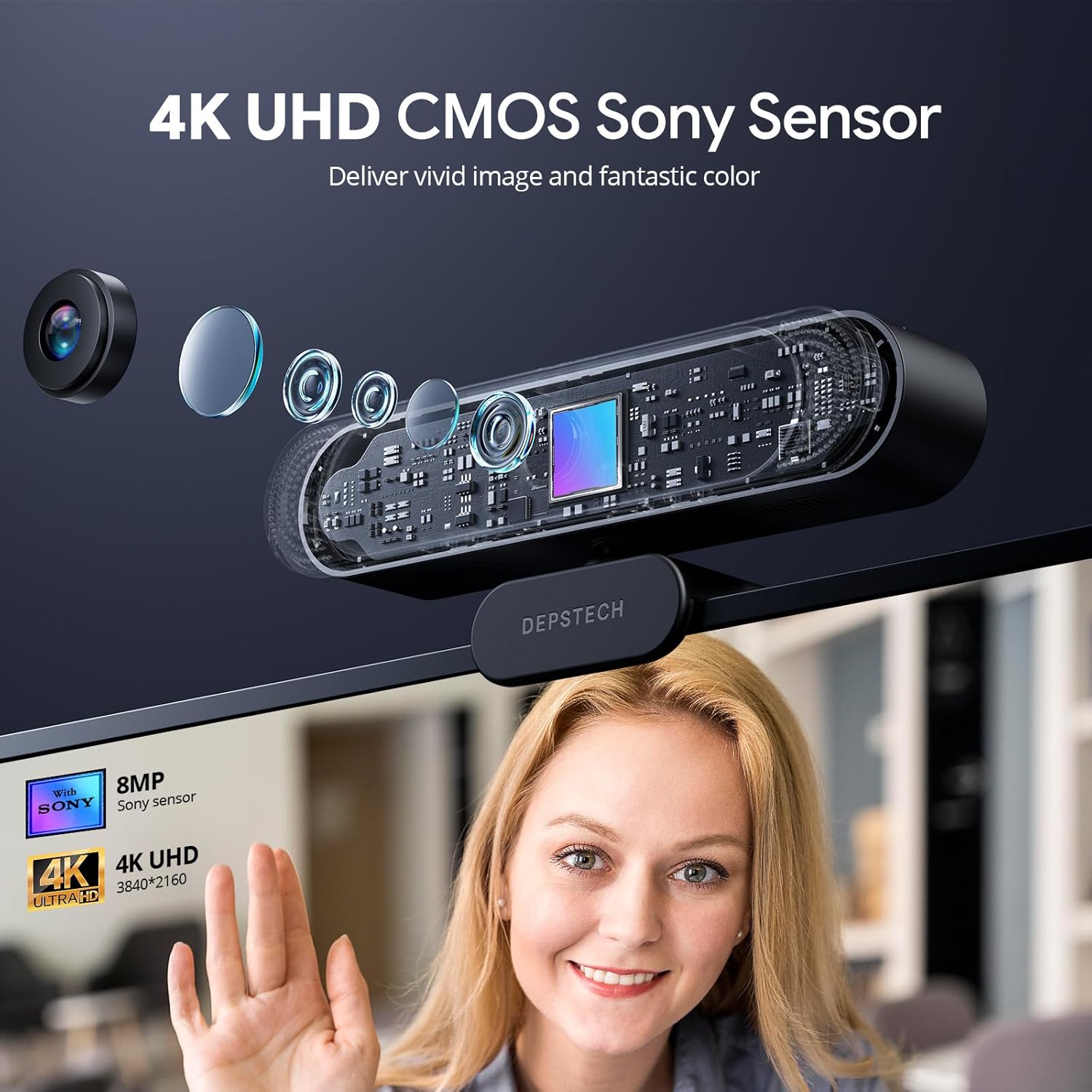
DEPSTECH DW49 Pro 4K webcam provides clear and smooth video. It is equipped with 3840*2160 resolution 8MP image 1/2.55'' sony sensor and 5-layer high-performance optical lens, built in dual noise canceling microphones, zoom function and more. The 80° view angle lens has a wider field of vision.
The 4K UHD resolution and 8mp display deliver detailed, high-definition and true-to-life images to take your meetings to the next level.
Captures life-like detail and excellent dynamic range.
You can get the desired picture quality by adjust the brightness/saturation/contrast
Built-in dual mics with automatic noise-canceling technology allows for clear sound recording.
DEPSTECH web camera can automatically focus on your face or the object within 3 seconds.
Place USB webcam almost anywhere you want. Not only you can makes it easy to mount the streaming webcam on computer external monitors, you also can place the webcam on flat surface with the included tripod.
Easy to set-up, plug and play, no additional driver required. With included Type-C adapter, the laptop webcam is compatible with USB-A as well as Type-C input ports.
After connecting the webcam into the MacBook Air, do I need to select the Depstech Webcam when opening a video software?
Yes, you need to manually select the device named Depstech Webcam.
Why can't I use the Zoom function?
Zoom function is available at 1080P resolution. Please change the resolution of the video software to 1080P or below.
How to disable autofocus?
You can click the Auto/Fixed focus button on the remote control to disable the autofocus.
고객 리뷰
4.30
(100 점수)
댓글 취소
댓글을 남겨주세요

배송 및 반품
우리가 당신을 보호하겠습니다
대부분 지역에서는 배송비를 한 번만 지불하시면 됩니다 (주문 및 배송 페이지를 확인해 주세요).
구매 후 14일 이내 무료 반품 가능 (단, 수명이 다한 제품, 맞춤 제작 상품, 마스크, 향수 및 에어로졸과 같이 위험하거나 인화성 물질이 포함된 일부 제품은 제외).
수입 관세 정보
복잡한 절차는 저희가 처리해 드리겠습니다. 카나리아 제도를 제외한 모든 EU 국가, 영국, 미국, 캐나다, 호주, 뉴질랜드, 푸에르토리코, 스위스, 싱가포르, 한국, 쿠웨이트, 멕시코, 카타르, 인도, 노르웨이, 사우디아라비아, 대만, 태국, UAE, 일본, 브라질, 맨섬, 산마리노, 콜롬비아, 칠레, 아르헨티나, 이집트, 레바논, 홍콩 특별행정구, 바레인, 터키로 배송되는 상품 가격에는 모든 수입 관세가 포함되어 있습니다. 표시된 가격이 최종 결제 금액입니다.
예상 배송 시간
특급 배송: 7-10일
해당 창고에서 배송되었습니다.
반품 정책
반품 정책
저희는 제품 품질에 자신 있습니다. 만약 구매하신 제품에 완전히 만족하지 못하신다면, 수령일로부터 30일 이내에 간편하게 반품하실 수 있도록 정책을 마련해 두었습니다.
간편한 교환 또는 환불
- 다른 사이즈, 색상 또는 스타일의 상품으로 교환하거나 전액 환불받을 수 있습니다.
- 반품되는 모든 상품은 착용하지 않은 상태여야 하며, 원래 포장 상태 그대로 모든 태그가 손상되지 않은 상태여야 합니다.
간단한 절차
- 온라인으로 반품을 신청하거나 고객 서비스 팀에 문의하여 도움을 받으실 수 있습니다.
- 물품을 제대로 포장해 주시고, 원래의 포장 목록도 함께 넣어주세요.
- 반품하실 상품을 보내주실 때에는 저희가 제공해 드린 선불 배송 라벨을 사용해 주시기 바랍니다.
- 환불 요청 접수 즉시 처리해 드리겠습니다.
반품과 관련하여 궁금한 점이나 우려 사항이 있으시면 언제든지 저희 전문 고객 서비스 팀에 문의해 주세요. 고객 만족은 저희의 최우선 목표입니다.