고객 서비스

판매자들은 가입하면 더 많은 혜택을 누릴 수 있습니다.

모든 주문 무료 배송.

입력 장치

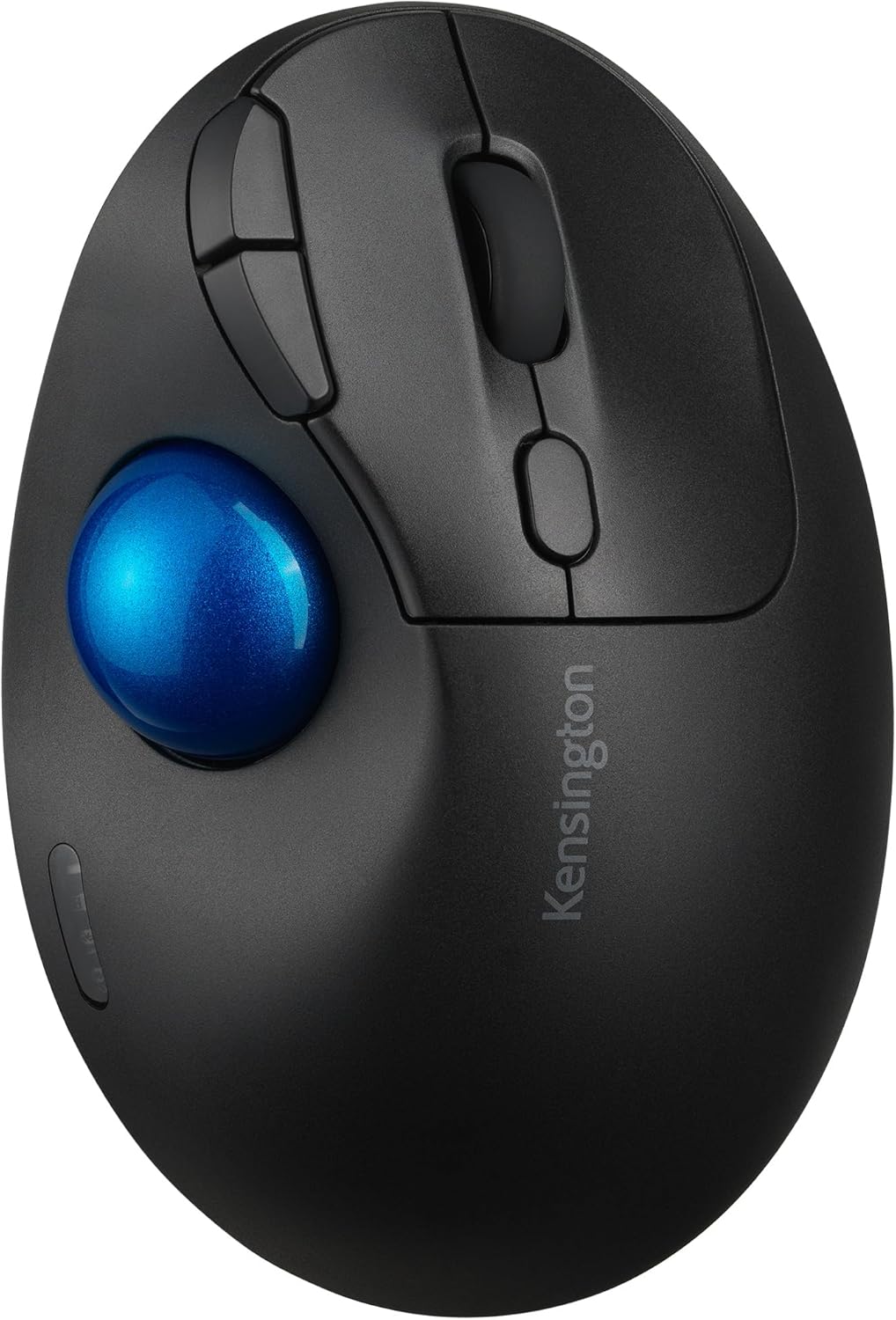
Kensington TB450 Wireless Trackball Mouse, Bluetooth LE & 2.4GHz Connection, 4 DPI Options, Connect up to 3 Devices (K72194WW), Black-Blue

4.20

지난 32시간 동안 판매됨 29

$ 31.27
$ 33.00
-5.53%

The media could not be loaded. Great product, great price. I use it everyday! Plus it is programmable, and I love how the ball housing has a push button that pops out the ball for cleaning. The different DPI button is awesome as well depending on how precise you are needing the mouse movement to be. Customer service is excellent. I’m very big on customer service support. It connects easily with either the dongle connection or Bluetooth connection. You are able to connect to 3 devices using the 2 Bluetooth and the one dongle. One mouse for 3 devices. It has a fantastic battery life. I can use my rechargeable batteries with it! So far it is still going strong off of the first charge on my battery. I do turn it off when not using it because my lovely cat likes to walk across my desk lol The smooth roll of the ball is probably the best feature though. Slight movement is all that’s needed, especially if you’re using it on a higher DPI setting. I have yet to find a downside. The ergonomic design is very helpful when it comes to my carpal tunnel, I experienced less pain and fatigue in my hand. Love this mouse! Yes, I’m a real customer who just loves this great working trackball mouse.

27 현재 누군가가 웹사이트를 탐색 중입니다.

Color
Charcoal Blue/Silver Black/Blue Black/Purple Black/Red Black/Silver White/Silver White
수량:
- +

예상 배송 시간: 12~26일(국제), 3~6일(미국)

구매일로부터 45일 이내에 반품이 가능합니다. 관세 및 세금은 환불되지 않습니다.

  • ASIN:

    B0CF8874DR

  • AVERAGE_BATTERY_LIFE_IN_HOURS:

    18 months

  • BATTERIES:

    1 AA batteries required. (included)

  • BEST_SELLERS_RANK:

    #12 in Computer Trackballs

  • BRAND:

    Kensington

  • COLOR:

    Black/Blue

  • COMPUTER_MEMORY_TYPE:

    DIMM

  • CUSTOMER_REVIEWS:

    4.2 4.2 out of 5 stars (475) 4.2 out of 5 stars

  • DATE_FIRST_AVAILABLE:

    August 10, 2023

  • HARDWARE_PLATFORM:

    Mac, PC

  • ITEM_DIMENSIONS_LXWXH:

    5.44 x 3.68 x 1.97 inches

  • ITEM_MODEL_NUMBER:

    K72194WW

  • ITEM_WEIGHT:

    4.6 ounces

  • LANGUAGE:

    English

  • MANUFACTURER:

    Kensington

  • OPERATING_SYSTEM:

    Windows, macOS

  • POWER_SOURCE:

    Battery Powered

  • PRODUCT_DIMENSIONS:

    5.44 x 3.68 x 1.97 inches

  • SERIES:

    ProFit Ergo TB450

안전한 결제를 보장하세요

제품 상세 정보
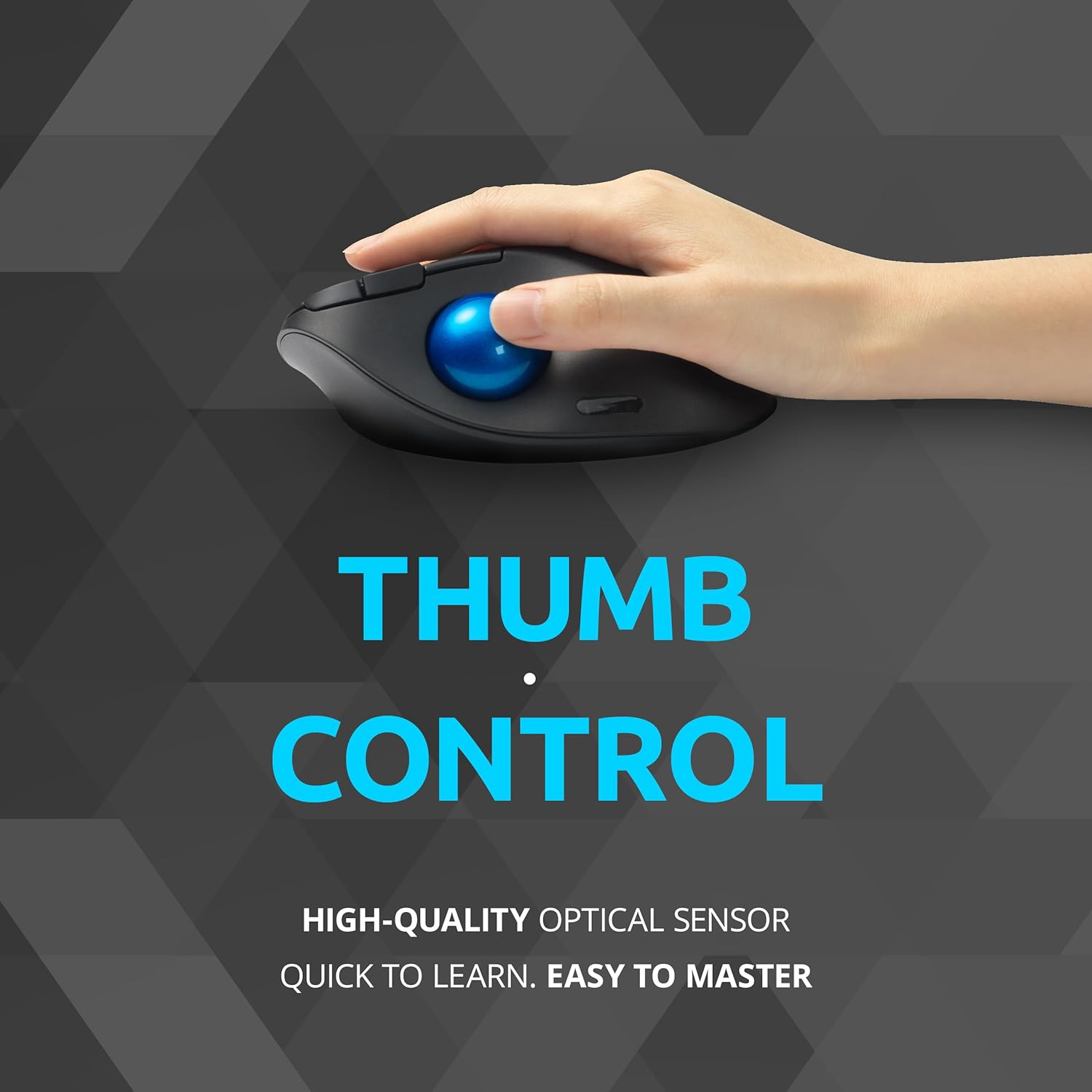
The Pro Fit Ergo TB450 Trackball brings the familiar feel of a mouse to a simple-to-use wireless trackball with a unique ergonomic design. It includes Bluetooth Low Energy (LE) and 2.4GHz wireless connection options for maximum flexibility, and 50% of overall plastic is recycled material. The Pro Fit Ergo TB450 also features long battery life, patented ball ejection system for easy cleaning, and precision opticaltracking technology. If you’re experiencing issues with your trackball mouse such as stickiness, slowness, or scrolling problems, it’s likely that it needs cleaning. Follow the steps below to clean and lubricate your trackball, restoring its optimal functionality. 1. Remove the ball from the socket using the eject button on the bottom of the trackball frame. 2. Clean the ball and trackball frame with a damp cloth or rubbing alcohol and allow them to dry. 3. Lightly lubricate the ball with a non-acidic lotion. We recommend using an oil-based lotion such as Vaseline for the best result. Evenly rub a pea-sized amount of lotion into the palms of your hands and roll the ball across the lotion on your hands until the ball is evenly lubricated. 4. Gently push the ball back into the socket. If the ball feels a little sticky, simply roll it around in the socket until it moves freely.
고객 리뷰
4.20

(100 점수)

5
8
4
4
3
10
2
16
1
62
댓글 취소
댓글을 남겨주세요

26 논평

1.0 out of 5 stars Faulty Product
2026-01-27    -Jalayer Khalilzadeh

I can't think of a worse product that I have bought in recent years. The left click acts as a universal scroll. When I install the KensingtonWorks app to reassign the click button, all buttons can be reassigned except the left one. The error message appears under another button, is not readable, and disappears so quickly. After multiple tries, I managed to copy the error message and searched for a solution, but none was found (The error message: "to program this button please assign another button as click button first."). I tried uninstalling the app and the driver, and then used both Bluetooth and the dongle, but the result was the same. I tried changing the primary key in Windows Mouse settings to try to solve this issue. It worked fine with the right key, but still can't fix the left key assignment issue. I also tried to contact their support, but since it was Sunday, nobody was available. If your product is this bad, I think you should have 24/7 support. I had had enough of this. I STRONGLY SUGGEST STAYING AWAY FROM THIS AWFUL PRODUCT AND COMPANY.

5.0 out of 5 stars Good value.
2026-01-10    -Masa

Such a good mouse. I like it because it can connect up to 3 devices. I personally do not like rechargeable battery one but this one is with normal AA battery. It is very smooth and ergonomically designed.

I was using a Magic Mouse with my Mac and found it wanting. I think the QC is dropping off in Apple accessories. Had a good experience with a relatively cheap track ball mouse; probably Chinese, but when I installed my new Mac Mini M4,I lost my old Chinese trackball mouse and reverted to the Apple Magic Mouse. After a few days of frustration, I looked for a relatively inexpensive trackball and settled on the Kensington TB450 Wireless Trackball Mouse.It was one of my better decisions. It is top quality and very responsive and easy to use. It is also very comfortable as well.I highly recommend it. Maybe the more expensive ones are better, but this Kensington is a good value.

The media could not be loaded. Great product, great price. I use it everyday! Plus it is programmable, and I love how the ball housing has a push button that pops out the ball for cleaning. The different DPI button is awesome as well depending on how precise you are needing the mouse movement to be. Customer service is excellent. I’m very big on customer service support. It connects easily with either the dongle connection or Bluetooth connection. You are able to connect to 3 devices using the 2 Bluetooth and the one dongle. One mouse for 3 devices. It has a fantastic battery life. I can use my rechargeable batteries with it! So far it is still going strong off of the first charge on my battery. I do turn it off when not using it because my lovely cat likes to walk across my desk lol The smooth roll of the ball is probably the best feature though. Slight movement is all that’s needed, especially if you’re using it on a higher DPI setting. I have yet to find a downside. The ergonomic design is very helpful when it comes to my carpal tunnel, I experienced less pain and fatigue in my hand. Love this mouse! Yes, I’m a real customer who just loves this great working trackball mouse.

Pas facile à configurer avec pc
2026-02-02    -Ted P.

Il y a mieux, je ne parviens pas à configurer avec le Bluetooth de mon pc 💻

I was using a Magic Mouse with my Mac and found it wanting. I think the QC is dropping off in Apple accessories. Had a good experience with a relatively cheap track ball mouse; probably Chinese, but when I installed my new Mac Mini M4,I lost my old Chinese trackball mouse and reverted to the Apple Magic Mouse. After a few days of frustration, I looked for a relatively inexpensive trackball and settled on the Kensington TB450 Wireless Trackball Mouse.It was one of my better decisions. It is top quality and very responsive and easy to use. It is also very comfortable as well.I highly recommend it. Maybe the more expensive ones are better, but this Kensington is a good value.

Pas facile à configurer avec pc
2026-02-28    -Ted P.

Il y a mieux, je ne parviens pas à configurer avec le Bluetooth de mon pc 💻

Une bonne souris ergo
2026-02-21    -DarKou

Utilisé en remplacement de ma MX Ergo. Rien à redire, très agréable à l'utilisation.

Impresionado
2026-01-24    -rafaelemoranb

Tengo un logitech ergo M575 y quería otro trackball de backup, pero no quería uno con batería integrada, por eso elegí Kensigton TB450 solo para probar y aquí hago mi reseña inicial:Punto neutro:- La inclinación de 45º es cómoda, pero casí no noto diferencia con la postura en mi ergo M575 que no tiene inclinación.- La conexión del ratón con el ordenador es encriptada, lo cual tiene sentido con teclados wireless (para evitar sniffing de lo que escribe el usuario) pero para un ratón... no termino de ver el valor que aporta.- Los clics son más agradables comparados con el logitech M575, aunque esto es relativo a cada usuarioPuntos positivos:- La calidad del plástico se ve muy bien, muy bien el acabado- La precisión del trackball es superior en Kensigton, ya que si giro muy rápido la bola con el pulgar, el puntero se mueve correctamente; si hago lo mismo con mi logitech, se siente que la bola gira muy rápido pero el sensor no lee el movimiento y en consecuencia el puntero ni se mueve.- La bola está mejor sujetada en el Kensigton; es decir, si giro muy rápido la bola entonces el puntero se se mueve según lo esperado; en mi Logitech, cuando giro la bola muy rápido, a veces se escucha que la bola golpea contra la pared interna del ratón lo cual hace que el puntero casi ni se mueva y es molesto tener que bajar la velocidad del pulgar sobretodo cuando quieres cruzar 2 monitores rápidamente- El software de KensigntonWorks me permite configurar una velocidad custom del trackball presionando alguna de las teclas shift,alt o ctrl (o alguna combinación). Por ejemplo, tengo la velocidad del trackball muy rápida para cruzar toda la pantalla sin esfuerzo del pulgar y luego cuando presiono la tecla "alt" la velocidad del trackball cambia, esto lo uso donde necesito más precisión. Este comportamiento tan práctico, no lo puedo configurar con LogiOptions, lo que puedo hacer con LogiOptions es presionar un boton para cambiar DPI o configurar DPI según la aplicación, pero la solución de Kensignton me parece más práctica.- He leído en otros reviews que el boton de cambio de DPI debería de estar arriba pero la verdad es que no necesito estar presionando el cambio de DPI si puedo configurar 2 velocidades en el mismo trackball. Imagino que el cambio de DPI lo necesitaré en linux donde no tengo la aplicación KensingtonWorks- Logitech implementa el scroll inercial en algunos ratones, y es algo que siempre he querido que lo querido en mi logitech Ergo M575 pero no existe. En el Kensignton lo implementan a nivel de software:el scroll fisico del ratón no se queda girando pero simulan una inercia para desplazarse más de una línea si se le da con fuerza al scroll y te permite avanzar muy rápido en documentos largos.- Si no nos gusta el scroll inercial, Kensigton permite configurar el avance del scroll, puede ser configurado a ir línea por línea o hacer scroll de 5 o 10 líneas a la vez, por lo que es otra forma de hacer scroll en documentos largosLista de deseos:- El ratón no tiene memoria integrada, es decir que necesito estar ejecutando KensigtonWorks para usar mis configuraciones; esto puede ser problema en equipos de trabajo con políticas de seguridad que impidan instalar cualquier software o en linux, donde puedo usar el ratón pero sin personalización.- KensigntonWorks oficial para linux- Sería ideal el mismo concepto de 2 velocidades del trackball (la velocidad normal y otra presionando la tecla shift, alt o ctrl) para la velocidad del scroll vertical; así podria tener por defecto un scroll vertical configurado de unas 10 líneas y presionando shift + scroll hacer el scroll de sólo una línea- Se le podría agregar el desplazamiento horizontal (implementado en el TB550) que en mi caso lo usaría para programar más botones (ya que el desplazamiento horizontal prefiero hacerlo con la tecla shift + scroll)- El software KensingtonWorks, funciona, pero no identifica todas las aplicaciones instaladas en windows; por ejemplo con el LogiOptions+ puedo personalizar los botones de mi M575 para que suba o baje volumen en aplicaciones como Amazon Music, Spotify, Prime Video, Netflix y esto es porque las identifica el software; sin embargo en KensigntonWorks no puedo... y si le doy a explorar, luego tendría que darle permisos de administrador al KensigntonWorks para explorar la carpeta c:\Program Files\WindowsApps... y no me parece dar permisos extraNota final- Estoy repensando en comprar el TB550, tiene 2 botones más (dezplazamiento horizontal) que pueden ser programables, pero me tira atrás la batería integrada; ya que siempre se degradan y para mí es más práctico usar 1 batería AA recargable. No quiero terminar siguiendo los pasos en algun video de youtube, abriendo el ratón para cambiar la batería integrada

The media could not be loaded. Great product, great price. I use it everyday! Plus it is programmable, and I love how the ball housing has a push button that pops out the ball for cleaning. The different DPI button is awesome as well depending on how precise you are needing the mouse movement to be. Customer service is excellent. I’m very big on customer service support. It connects easily with either the dongle connection or Bluetooth connection. You are able to connect to 3 devices using the 2 Bluetooth and the one dongle. One mouse for 3 devices. It has a fantastic battery life. I can use my rechargeable batteries with it! So far it is still going strong off of the first charge on my battery. I do turn it off when not using it because my lovely cat likes to walk across my desk lol The smooth roll of the ball is probably the best feature though. Slight movement is all that’s needed, especially if you’re using it on a higher DPI setting. I have yet to find a downside. The ergonomic design is very helpful when it comes to my carpal tunnel, I experienced less pain and fatigue in my hand. Love this mouse! Yes, I’m a real customer who just loves this great working trackball mouse.

댓글을 남겨주세요:

댓글 제목
댓글 내용
배송 및 반품
우리가 당신을 보호하겠습니다

대부분 지역에서는 배송비를 한 번만 지불하시면 됩니다 (주문 및 배송 페이지를 확인해 주세요).

구매 후 14일 이내 무료 반품 가능 (단, 수명이 다한 제품, 맞춤 제작 상품, 마스크, 향수 및 에어로졸과 같이 위험하거나 인화성 물질이 포함된 일부 제품은 제외).

수입 관세 정보

복잡한 절차는 저희가 처리해 드리겠습니다. 카나리아 제도를 제외한 모든 EU 국가, 영국, 미국, 캐나다, 호주, 뉴질랜드, 푸에르토리코, 스위스, 싱가포르, 한국, 쿠웨이트, 멕시코, 카타르, 인도, 노르웨이, 사우디아라비아, 대만, 태국, UAE, 일본, 브라질, 맨섬, 산마리노, 콜롬비아, 칠레, 아르헨티나, 이집트, 레바논, 홍콩 특별행정구, 바레인, 터키로 배송되는 상품 가격에는 모든 수입 관세가 포함되어 있습니다. 표시된 가격이 최종 결제 금액입니다.

예상 배송 시간

특급 배송: 7-10일

해당 창고에서 배송되었습니다.

더 자세한 정보가 필요하신가요?
반품 정책
반품 정책

저희는 제품 품질에 자신 있습니다. 만약 구매하신 제품에 완전히 만족하지 못하신다면, 수령일로부터 30일 이내에 간편하게 반품하실 수 있도록 정책을 마련해 두었습니다.

간편한 교환 또는 환불
  • 다른 사이즈, 색상 또는 스타일의 상품으로 교환하거나 전액 환불받을 수 있습니다.
  • 반품되는 모든 상품은 착용하지 않은 상태여야 하며, 원래 포장 상태 그대로 모든 태그가 손상되지 않은 상태여야 합니다.
간단한 절차
  • 온라인으로 반품을 신청하거나 고객 서비스 팀에 문의하여 도움을 받으실 수 있습니다.
  • 물품을 제대로 포장해 주시고, 원래의 포장 목록도 함께 넣어주세요.
  • 반품하실 상품을 보내주실 때에는 저희가 제공해 드린 선불 배송 라벨을 사용해 주시기 바랍니다.
  • 환불 요청 접수 즉시 처리해 드리겠습니다.

반품과 관련하여 궁금한 점이나 우려 사항이 있으시면 언제든지 저희 전문 고객 서비스 팀에 문의해 주세요. 고객 만족은 저희의 최우선 목표입니다.

범주
차이
제품
모든 제품 지우기