고객 서비스

판매자들은 가입하면 더 많은 혜택을 누릴 수 있습니다.

모든 주문 무료 배송.

위성 TV

Winegard Company PL-7000R Dish Playmaker Portable Antenna , White

4.30

지난 32시간 동안 판매됨 21

$ 399.00
$ 418.00
-4.76%

After setting up and testing the system in my driveway multiple times I was very pleased with this purchase. With the first camping trip the satellite worked well for two days. On the third day it would not work at all... I kept getting an on screen message "cannot locate signal, check all connections and call Dish." After several calls to Dish and checking all connections, re-booting several times I finally gave up and waited until returning home. I made several attempts to get through to Winegard and once I finally got through the tech person said to check the voltage at both the receiver and dish ends of the coax. I was showing a range of 13 to 19 volts and the system would work about half the time. I strongly suspect a bad receiver. The Winegard tech said I was covered under the two year warranty but since the problem was intermittent if I were to return the unit to the factory they may or may not be able to fix the problem unless they could duplicate the same issue I was having at home. After replacing my new coax cable with another new coax cable when I test the system I get the "cannot locate signal" message immediately followed by the dish working correctly then flashing back to the "cannot locate" message and then back to programming. Quite frankly, having spent $300 for a system that works intermittently and cannot get decent customer service from either Dish or Winegard I would not recommend buying this product with the Wally receiver. If you do buy, make sure everything is working correctly BEFORE the 30 day Amazon return window closes.UPDATE 6-10-2018Upgraded to three stars since my problems seem to be resolved. I called Dish Customer Service and finally connected with a very capable young man who spent 2 1/2 hours on the phone with me and checked what seemed to be almost every test in the book. The software was seriously out of date and one glitch is the button labelled "Upgrade my Software" doesn't work and only tells you that whatever version you have is already current and up to date... Wrong!! As of 6-9-2018 the current software version is U438. There are 3 ways to update: 1.) if you are already a Dish customer take the receiver inside and hook it up to your home satellite wiring. The receiver will update at 1 AM or so automatically. 2.) Clear the memory by unplugging the receiver, disconnect the coax to the dish and plug the receiver back in to reboot through the whole process. Of course the dish won't find anything because the coax is disconnected but the memory will be cleared. Then connect the coax back to the dish and reboot. After the reboot, and assuming you are receiving something, use the remote to turn off power to the receiver which puts it into standby mode where you will watch the dancing "tips" square. After a couple of minutes the receiver will begin a software download and install. 3.) As in step #1, if you are not a home Dish customer, leave the system plugged in overnight for the automatic update and download. To see what version software you have now, and to confirm if anything has changed, push the Home button on the remote three times and look for the software version in the middle of the page. If you have U438 (now U802 as of July 8, 2019) you will be current.Since I am by no means an expert about any of this I urge you to call Dish technical support and have them walk you through everything. Don't waste your time with Winegard. I upgraded to 3 stars because I am willing to give Dish technical support 5 stars but I am not 100% sure that the software is perfect and may still have future issues. Overall this process should be automatic but at least I have learned there are answers to our problems with the Wally. My confidence is restored.UPDATE 9-4-2018My system is slowly improving with time. The software has updated a little but still uses the U438 designation. The reboot takes about 10 minutes or less now however the guide doesn't always download and I have to repeat the process occasionally. In the diagnostics area the "Upgrade my Software" button now actually works where the system will reboot on its own and try to find anything current. I am still having problems getting the complete loss of signal screen for one second followed by programming for one second then the signal loss screen then programming which flashes back and forth like a neon sign. I found that if I quickly use the channel up button to change channels when the screen flashes to the program for one second the receiver will change to that channel. When I then use the channel down button everything seems to work OK after that. As Dish will tell you on their website if you do not use the Wally receiver for two weeks or so the receiver goes into sleep mode and you will not receive programming until the receiver is reauthorized. One great improvement is to download the MY DISH app to your phone because you can now 'wake up' the receiver without having to make a phone call or go online to the website. In the app scroll to the bottom to find the Dish Outdoors tab, find and click the reauthorize button... works like magic!UPDATE 10-20-2018Three more week long trips and finally this system is working reliably. Works well using my generator or solar powered inverter and on-board batteries. I am still getting the flashing 'no signal' message followed by a working program but I simply push the channel up button to change channel and then come back to my original channel and all is working well. Start-up takes about 8 minutes or so. My only wish at this point is that Dish would include a memory for the receiver so once power is disconnected the receiver and dish would remember the last setting if nothing has changed in the interim. Another useful option would be to offer this system in 12 volt only so the inverter would not be necessary.UPDATE: July 8, 2019After being in storage for six months I reactivated my Wally receiver on the Dish website and turned on the system. Once the boot had completed the first thing I did was go into the diagnostic/tools area and hit the button labeled "Upgrade my Software". It promptly told me my current version of U448 from last December was up-to-date and would not reboot and look for anything newer. To clear the memory I then unplugged the receiver, disconnected the coax and plugged the receiver back in. As expected the process only went as far as giving me a message to "check all connections". USING THE REMOTE I then turned off the Wally receiver, re-connected the coax to the dish and waited while watching the 'dancing tips' square... After about 5 minutes the receiver started a new download since the memory had been cleared. In all it took about 20 - 30 minutes and upgraded everything. Do NOT turn off the power or unplug while upgrading. When the screen returned back to the dancing 'tips' square I then turned the system back on and checked the software version number: it is now current at U802.9/14/2019Repeated the exact same procedure as listed above, current software version is U806. Dish works perfect.UPDATE January 2023Continues to work well with no issues. I have added a hard drive which enables the DVR function and a wireless adaptor to bring in Netflix & on-demand features.

10 현재 누군가가 웹사이트를 탐색 중입니다.

Style
Antenna With Receiver Antenna Only
수량:
- +

예상 배송 시간: 12~26일(국제), 3~6일(미국)

구매일로부터 45일 이내에 반품이 가능합니다. 관세 및 세금은 환불되지 않습니다.

  • ASIN:

    B074CPRJSD

  • BEST_SELLERS_RANK:

    #48,554 in Electronics (See Top 100 in Electronics) #38 in Satellite Dishes

  • BRAND_NAME:

    Winegard

  • COLOR_NAME:

    White

  • CUSTOMER_REVIEWS:

    4.3 4.3 out of 5 stars (1,987) 4.3 out of 5 stars

  • DATE_FIRST_AVAILABLE:

    June 9, 2017

  • IMPEDANCE:

    50 Ohms

  • IS_DISCONTINUED_BY_MANUFACTURER:

    No

  • ITEM_MODEL_NUMBER:

    PL7000R

  • ITEM_WEIGHT:

    7 pounds

  • PRODUCT_DIMENSIONS:

    16 x 16 x 13 inches

안전한 결제를 보장하세요

제품 상세 정보
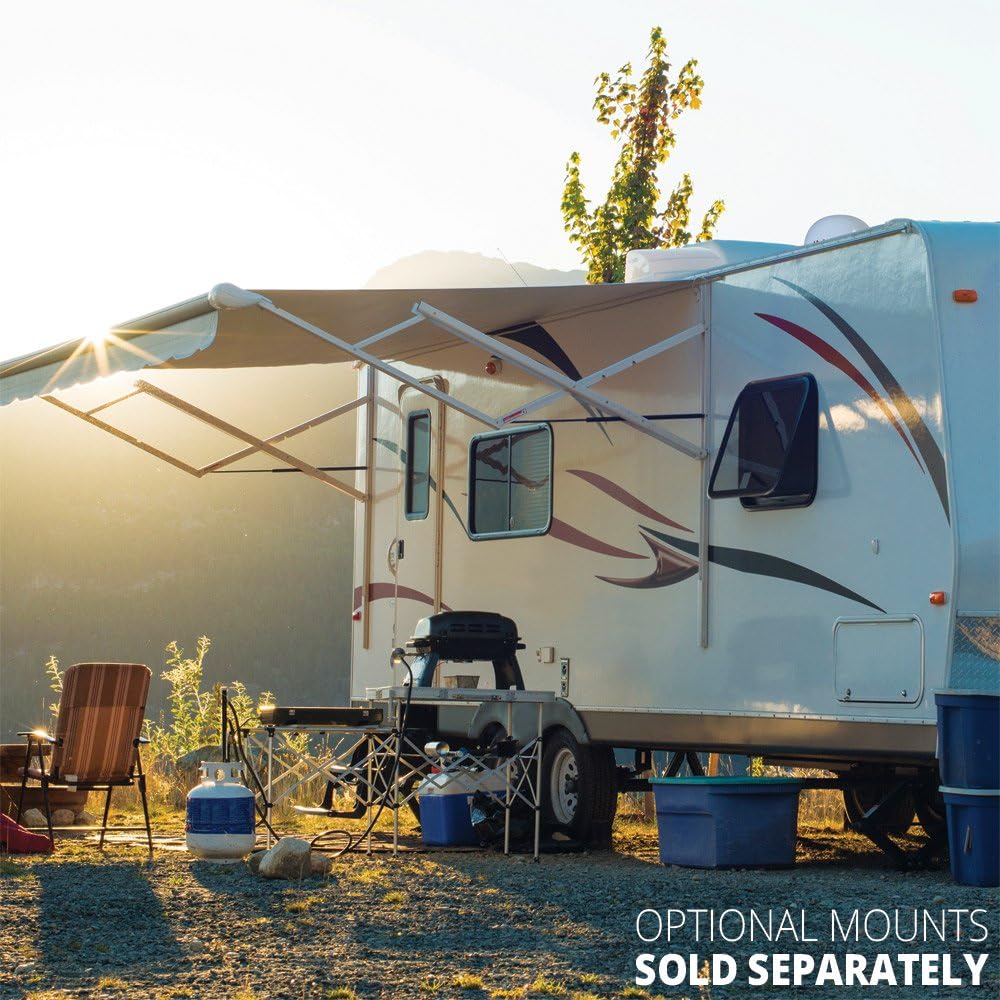
The DISH Playmaker PL7000R features a lower cost redesigned form. High-grade materials and low-profile for optimal performance. Features high-strength, military-grade aluminum reflector for improved signal strength. Up to 20% greater signal strength! Mount the PL7000R on the roof of your RV using the optional RK-4000 roof mount kit (sold separately). UV-protected plastic dome.
고객 리뷰
4.30

(100 점수)

5
10
4
4
3
5
2
10
1
71
댓글 취소
댓글을 남겨주세요

18 논평

After setting up and testing the system in my driveway multiple times I was very pleased with this purchase. With the first camping trip the satellite worked well for two days. On the third day it would not work at all... I kept getting an on screen message "cannot locate signal, check all connections and call Dish." After several calls to Dish and checking all connections, re-booting several times I finally gave up and waited until returning home. I made several attempts to get through to Winegard and once I finally got through the tech person said to check the voltage at both the receiver and dish ends of the coax. I was showing a range of 13 to 19 volts and the system would work about half the time. I strongly suspect a bad receiver. The Winegard tech said I was covered under the two year warranty but since the problem was intermittent if I were to return the unit to the factory they may or may not be able to fix the problem unless they could duplicate the same issue I was having at home. After replacing my new coax cable with another new coax cable when I test the system I get the "cannot locate signal" message immediately followed by the dish working correctly then flashing back to the "cannot locate" message and then back to programming. Quite frankly, having spent $300 for a system that works intermittently and cannot get decent customer service from either Dish or Winegard I would not recommend buying this product with the Wally receiver. If you do buy, make sure everything is working correctly BEFORE the 30 day Amazon return window closes.UPDATE 6-10-2018Upgraded to three stars since my problems seem to be resolved. I called Dish Customer Service and finally connected with a very capable young man who spent 2 1/2 hours on the phone with me and checked what seemed to be almost every test in the book. The software was seriously out of date and one glitch is the button labelled "Upgrade my Software" doesn't work and only tells you that whatever version you have is already current and up to date... Wrong!! As of 6-9-2018 the current software version is U438. There are 3 ways to update: 1.) if you are already a Dish customer take the receiver inside and hook it up to your home satellite wiring. The receiver will update at 1 AM or so automatically. 2.) Clear the memory by unplugging the receiver, disconnect the coax to the dish and plug the receiver back in to reboot through the whole process. Of course the dish won't find anything because the coax is disconnected but the memory will be cleared. Then connect the coax back to the dish and reboot. After the reboot, and assuming you are receiving something, use the remote to turn off power to the receiver which puts it into standby mode where you will watch the dancing "tips" square. After a couple of minutes the receiver will begin a software download and install. 3.) As in step #1, if you are not a home Dish customer, leave the system plugged in overnight for the automatic update and download. To see what version software you have now, and to confirm if anything has changed, push the Home button on the remote three times and look for the software version in the middle of the page. If you have U438 (now U802 as of July 8, 2019) you will be current.Since I am by no means an expert about any of this I urge you to call Dish technical support and have them walk you through everything. Don't waste your time with Winegard. I upgraded to 3 stars because I am willing to give Dish technical support 5 stars but I am not 100% sure that the software is perfect and may still have future issues. Overall this process should be automatic but at least I have learned there are answers to our problems with the Wally. My confidence is restored.UPDATE 9-4-2018My system is slowly improving with time. The software has updated a little but still uses the U438 designation. The reboot takes about 10 minutes or less now however the guide doesn't always download and I have to repeat the process occasionally. In the diagnostics area the "Upgrade my Software" button now actually works where the system will reboot on its own and try to find anything current. I am still having problems getting the complete loss of signal screen for one second followed by programming for one second then the signal loss screen then programming which flashes back and forth like a neon sign. I found that if I quickly use the channel up button to change channels when the screen flashes to the program for one second the receiver will change to that channel. When I then use the channel down button everything seems to work OK after that. As Dish will tell you on their website if you do not use the Wally receiver for two weeks or so the receiver goes into sleep mode and you will not receive programming until the receiver is reauthorized. One great improvement is to download the MY DISH app to your phone because you can now 'wake up' the receiver without having to make a phone call or go online to the website. In the app scroll to the bottom to find the Dish Outdoors tab, find and click the reauthorize button... works like magic!UPDATE 10-20-2018Three more week long trips and finally this system is working reliably. Works well using my generator or solar powered inverter and on-board batteries. I am still getting the flashing 'no signal' message followed by a working program but I simply push the channel up button to change channel and then come back to my original channel and all is working well. Start-up takes about 8 minutes or so. My only wish at this point is that Dish would include a memory for the receiver so once power is disconnected the receiver and dish would remember the last setting if nothing has changed in the interim. Another useful option would be to offer this system in 12 volt only so the inverter would not be necessary.UPDATE: July 8, 2019After being in storage for six months I reactivated my Wally receiver on the Dish website and turned on the system. Once the boot had completed the first thing I did was go into the diagnostic/tools area and hit the button labeled "Upgrade my Software". It promptly told me my current version of U448 from last December was up-to-date and would not reboot and look for anything newer. To clear the memory I then unplugged the receiver, disconnected the coax and plugged the receiver back in. As expected the process only went as far as giving me a message to "check all connections". USING THE REMOTE I then turned off the Wally receiver, re-connected the coax to the dish and waited while watching the 'dancing tips' square... After about 5 minutes the receiver started a new download since the memory had been cleared. In all it took about 20 - 30 minutes and upgraded everything. Do NOT turn off the power or unplug while upgrading. When the screen returned back to the dancing 'tips' square I then turned the system back on and checked the software version number: it is now current at U802.9/14/2019Repeated the exact same procedure as listed above, current software version is U806. Dish works perfect.UPDATE January 2023Continues to work well with no issues. I have added a hard drive which enables the DVR function and a wireless adaptor to bring in Netflix & on-demand features.

Dish works to get TV in an area where over the air channels are essentially non existent. Set up was reasonably straight forward. A little clumsy in a few places, but fewer problems than others have reported.Day to day operation is occasionally an issue. The unit has not been moved since installation, but about 2-3 times a week it completely loses connection and has to go through it's 5 minute find the satellite routine. Every other time with that, it then can't find the local channels and everything has to be reset which takes 15 - 30 minutes. So if you want to watch a local channel be advised you need a 30 minute head start about half of the time.

Extremely fast delivery deserves 5 stars, so does the ease of installation (installed on the top of an RV roof). Whether it works and how user friendly it is, I cannot judge as there is, as fully expected, no DISH signal in central Alberta, Canada. The antenna will be put to use, and as such tested, in mid-November when traveling in the US.

Location
2026-01-13    -Donald Morrow

You need to specify what country this will work in. I'm in canada this only works in USA

I bought this system in preparation for a cross-country RV trip. We drove from Seattle to Boston and back again. I tested the system in Seattle and it worked fine. My first chance to use it on the road came in northern Wyoming. Couldn't get a signal. Tried everything suggested by the onscreen messages, no dice. Called Dish Outdoors and they had me try a few things. No workie. Well, ok, maybe those trees way over there on the horizon are interfering with the signal. We'll try it again somewhere else. Iowa. Nope. Indiana. Nope. Pennsylvania. Nope. New York. Nope. New Jersey. Nope. Nebraska. Nope. Nebraska, for crying out loud. Do you know what Nebraska looks like? Sorry, Dish can't get a signal there. To finish the list - Idaho, nope. Oregon. Nope. I rarely write a bad review about anything but, folks, this system is a complete and total piece of crap!

5.0 out of 5 stars Really roughing it.
2026-01-05    -Ken61

Good antenna for camping if you don't want to really rough it. Self adjusting, just place it where it can point to the south with nothing in its way. I place ours on top of the RV.

5.0 out of 5 stars It is easy to setup
2026-01-11    -Amazon Customer

Works great finds signal real fast

Right product.
2026-01-05    -Dennis Cooze

Was not compatible with Bell,thought it was,returned it.

5.0 out of 5 stars Really roughing it.
2026-02-19    -Ken61

Good antenna for camping if you don't want to really rough it. Self adjusting, just place it where it can point to the south with nothing in its way. I place ours on top of the RV.

Right product.
2026-01-31    -Dennis Cooze

Was not compatible with Bell,thought it was,returned it.

댓글을 남겨주세요:

댓글 제목
댓글 내용
배송 및 반품
우리가 당신을 보호하겠습니다

대부분 지역에서는 배송비를 한 번만 지불하시면 됩니다 (주문 및 배송 페이지를 확인해 주세요).

구매 후 14일 이내 무료 반품 가능 (단, 수명이 다한 제품, 맞춤 제작 상품, 마스크, 향수 및 에어로졸과 같이 위험하거나 인화성 물질이 포함된 일부 제품은 제외).

수입 관세 정보

복잡한 절차는 저희가 처리해 드리겠습니다. 카나리아 제도를 제외한 모든 EU 국가, 영국, 미국, 캐나다, 호주, 뉴질랜드, 푸에르토리코, 스위스, 싱가포르, 한국, 쿠웨이트, 멕시코, 카타르, 인도, 노르웨이, 사우디아라비아, 대만, 태국, UAE, 일본, 브라질, 맨섬, 산마리노, 콜롬비아, 칠레, 아르헨티나, 이집트, 레바논, 홍콩 특별행정구, 바레인, 터키로 배송되는 상품 가격에는 모든 수입 관세가 포함되어 있습니다. 표시된 가격이 최종 결제 금액입니다.

예상 배송 시간

특급 배송: 7-10일

해당 창고에서 배송되었습니다.

더 자세한 정보가 필요하신가요?
반품 정책
반품 정책

저희는 제품 품질에 자신 있습니다. 만약 구매하신 제품에 완전히 만족하지 못하신다면, 수령일로부터 30일 이내에 간편하게 반품하실 수 있도록 정책을 마련해 두었습니다.

간편한 교환 또는 환불
  • 다른 사이즈, 색상 또는 스타일의 상품으로 교환하거나 전액 환불받을 수 있습니다.
  • 반품되는 모든 상품은 착용하지 않은 상태여야 하며, 원래 포장 상태 그대로 모든 태그가 손상되지 않은 상태여야 합니다.
간단한 절차
  • 온라인으로 반품을 신청하거나 고객 서비스 팀에 문의하여 도움을 받으실 수 있습니다.
  • 물품을 제대로 포장해 주시고, 원래의 포장 목록도 함께 넣어주세요.
  • 반품하실 상품을 보내주실 때에는 저희가 제공해 드린 선불 배송 라벨을 사용해 주시기 바랍니다.
  • 환불 요청 접수 즉시 처리해 드리겠습니다.

반품과 관련하여 궁금한 점이나 우려 사항이 있으시면 언제든지 저희 전문 고객 서비스 팀에 문의해 주세요. 고객 만족은 저희의 최우선 목표입니다.

범주
차이
제품
모든 제품 지우기